
NuvebsA1 Backup is a unlimited Backup Solutions for Windows and Mac.
The starting storage block is 512GB up to Unlimited storage.
It is an easy and user friendly application. You can Backup your computer data in some clicks.
After you've downloaded the NuvebsA1 software on your Backup Portal (xxx.nuvebsa1.com) and logged through the NuvebsA1 backup application with your credentials you can setup and manage your backups.
Backup:
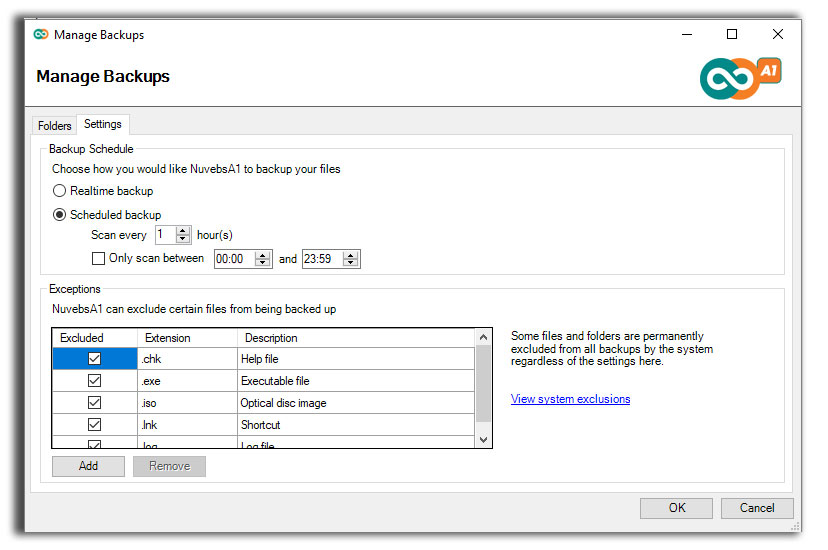
Click on the NuvebsA1 icon on the bottom of the screen on Windows or to the top on Mac, then click manage backup.

Settings:
You can ser Backups to be done Realtime or on a Schedule time you can do it on the Settings tab.
Speed:
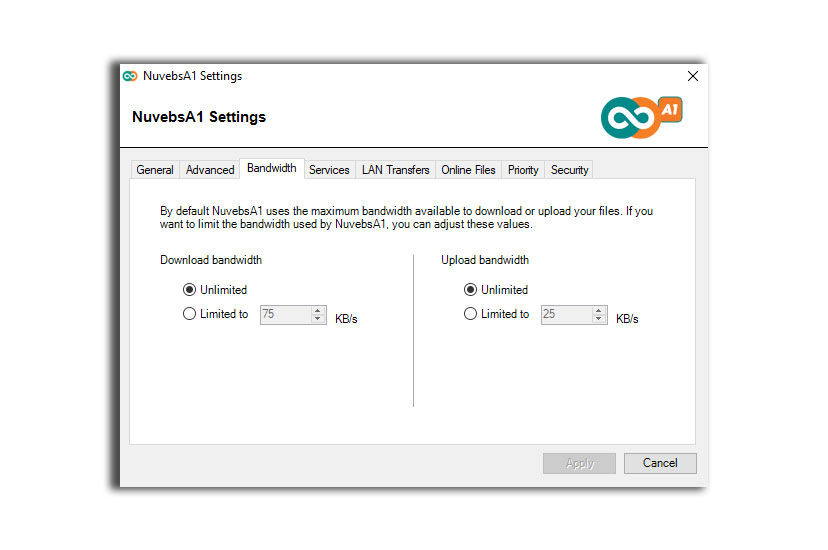
Speeds Limits can be Unlimited or limited as it downloads or uploads.
NuvebsA1 BackPack and ProSuite
LAN Transfers:
Users can use peer-to-peer local network transfers by enabling LAN Transfers. If you have multiple computers on the same local area network that use the same NuvebsA1 BackPack or NuvebsA1 ProSuite account then the LAN transfer feature will sync files between each computer over the LAN, as well as uploading them online. This means that if one user adds or updates a file on their computer, the file is updated on other network PCs almost instantly, without having to wait for it to upload to the Cloud servers first. This feature is great for businesses that use NuvebsA1 to share files within the office.

Comments
0 comments
Article is closed for comments.